Finding the right indoor golf simulator kit can transform your practice routine, especially when you’re limited by weather or daylight. This guide highlights five top options available in the United Kingdom, focusing on accuracy, ease of use, and compatibility with common devices. Each product offers a distinct balance of swing analysis, ball flight data, and immersive practice experiences to help golfers of all levels sharpen their skills from the comfort of home.
Summary of chosen products
| Product | Brand | Key Feature |
|---|---|---|
| Square Golf Indoor Launch Monitor | Square Golf | Accurate ball speed, spin, 3D courses |
| Rapsodo MLM2PRO | Rapsodo | Dual camera vision with radar, swing replay |
| ExPutt EX500D Pro Putting Simulator | ExPutt | Real course greens, instant putting feedback |
| TheStack Radar | The Stack System | App-based training, speed and wedge data |
| Durbles Golf Simulator Strike Screen | Durbles | Premium three-layer impact screen with safety padding |
Square Golf Launch Monitor For Home Use

Square Golf’s indoor launch monitor is designed for home practice with realistic feedback. The device captures ball speed, direction, angle, and spin rate, providing detailed shot analysis to support improvement in a home setup. It supports Android, Apple, and Windows, ensuring broad compatibility for everyday practice. Its 3D course visuals and practical practice modes aim to simulate real-world scenarios, helping players adjust swing and club selection in a controlled space. This monitor is positioned as a versatile option for dedicated home gamers seeking precise metrics.
Key features include a high-speed camera for precise measurements, a portable design for easy placement, and comprehensive data on apex, carry, and trajectory. The setup is straightforward, making it suitable for players who want immediate feedback during practice sessions. While it emphasizes home use, the realism of the courses and the depth of data can support both casual sessions and structured training routines.
In terms of user experience, the combination of Android, iOS, and Windows compatibility means it can connect with a range of devices for display and feedback. Depending on your room size and screen options, you can tailor the environment to mirror wind, elevation, and course layouts, creating an engaging training environment that mirrors the feeling of real rounds.
Rapsodo MLM2PRO Mobile Launch Monitor

Rapsodo MLM2PRO combines a mobile launch monitor with a golf simulator, delivering precision through dual optical cameras and radar processing. This setup provides Shot Vision and Impact Vision for swing replay, enabling comprehensive analysis of your technique and ball flight. The combination helps players track direction, speed, apex, carry, and more, delivering actionable data for practice sessions at home or on the go. The MLM2PRO is designed for players who value visual feedback and the ability to review swings from multiple angles.
Features worth noting include high-accuracy data capture, real-time feedback, and integrated replay options that assist with swing corrections. The compact, portable design makes it suitable for quick practice sessions, while the robust data output supports structured drills, wedge work, and ball-striking improvements. The device’s compatibility with a range of devices further improves its practicality for home setups and shared spaces.
For users who enjoy a visual training approach, the MLM2PRO’s Shot Vision and Impact Vision tools provide intuitive insights into how your swing converts to ball flight. The system is well-suited for players seeking a balance between convenience and detailed data analysis, with a focus on repeatable results over multiple sessions.
ExPutt EX500D Pro Putting Simulator

The ExPutt EX500D Pro focuses on putting practice, bringing a high-speed camera-based system into living rooms. It uses software to track swing mechanics and ball movement, pairing with a putting mat for convenient setup. Practitioners can roll out the mat, plug in the camera, and immediately begin structured putting sessions with feedback that covers speed, direction, and face angle. Real greens and course-like undulations provide a realistic feel that supports short-game development rather than full-swing work alone.
Key advantages include easy installation, a wide range of real-world greens (with over 70 courses and growing), and instant performance analysis. The ability to practice on actual greens helps players understand how speed and line translate to distance on the course. Feedback is designed to guide incremental improvements, making it a practical addition for players prioritising the short game in a compact home setup.
Users should consider space requirements, as a dedicated putting area is recommended to maximise the realism of greens and undulations. The EX500D Pro is ideal for those who want a focused putting solution that complements longer-range simulations or standalone practice sessions in smaller rooms.
TheStack Radar For Home Golf Training
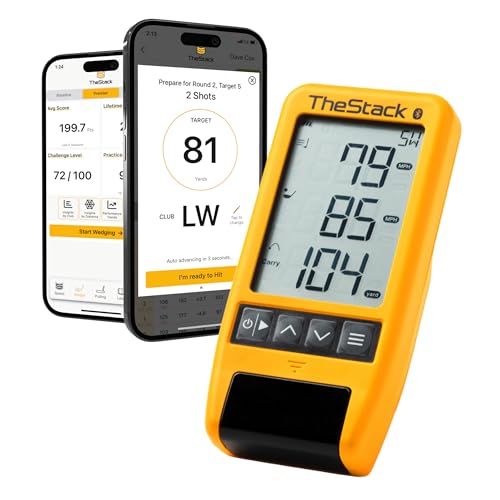
TheStack Radar offers a home-based golf training platform with app-based connectivity. It measures swing speed and ball speed, then estimates carry distance and smash factor. Designed for speed training, it supports Stack Wedge practice and on-course data capture. The system integrates with the Stack app, available for iOS and Android, to provide a seamless flow of training data. A one-month free trial to Stack Wedge Mode is included with purchase, offering gamified practice sessions that target distance control and wedge accuracy.
Consider the flexibility and ecosystem when evaluating TheStack Radar. The device focuses on swift feedback and practical drills, enabling users to track progress over time. The inclusion of a dedicated wedging app adds an engaging, structured path for improving precision with short irons and wedges. Bluetooth connectivity ensures easy pairing with mobile devices, allowing practice to occur in various spaces without complicated setups.
Durbles Strike Screen For Home Golf

The Durbles Strike Screen provides a premium three-layer launch monitor screen with an HD outer layer, a sound-damping middle layer, and a strong inner layer. It is designed to withstand thousands of ball impacts, making it suitable for home garages or dedicated practice rooms. The product emphasizes durability and quiet operation, which helps maintain a focused practice environment even in smaller spaces. A projector-friendly option allows for large, immersive displays without excessive reverberation.
Safety and build quality are central to this product, with thick padding and foam designed to reduce bounce-back and rebound noise. This contributes to a more controlled practice session when used in combination with a projector or screen setup. Depending on your space, this screen can be a centerpiece for a full indoor golf bay, supporting broader simulator components and ensuring long-term reliability.
Buying Guide: Key Considerations For Choosing An Indoor Golf Simulator
- Budget and space: Determine how much floor and wall area you can allocate, and balance price against the level of data you receive. Some kits prioritise compact portability, while others offer larger screens and more robust construction.
- Data depth vs. ease of use: More advanced systems provide detailed metrics like ball speed, spin rate, apex, and carry. Simpler setups may focus on basic shot tracking but still offer valuable feedback for improvement.
- Compatibility: Check device compatibility with your smartphone, tablet, or computer, as well as whether the system integrates with preferred apps. Bluetooth and USB options can impact ease of setup.
- Course realism and visuals: Realistic 3D courses and greens enhance immersion. Look for high-quality textures, varied greens, and reliable shot dispersion in your chosen environment.
- Durability and safety: If you use a large screen or enclosure, ensure the frame and screen materials are sturdy and that padding and nets minimise rebound and noise for domestic use.
- Putting and short-game focus: If improving precision around the greens is a priority, consider dedicated putting simulators or enclosures with realistic greens and undulations.
- Support and updates: Consider the availability of software updates, customer support, and community training resources, which can extend the product’s value over time.